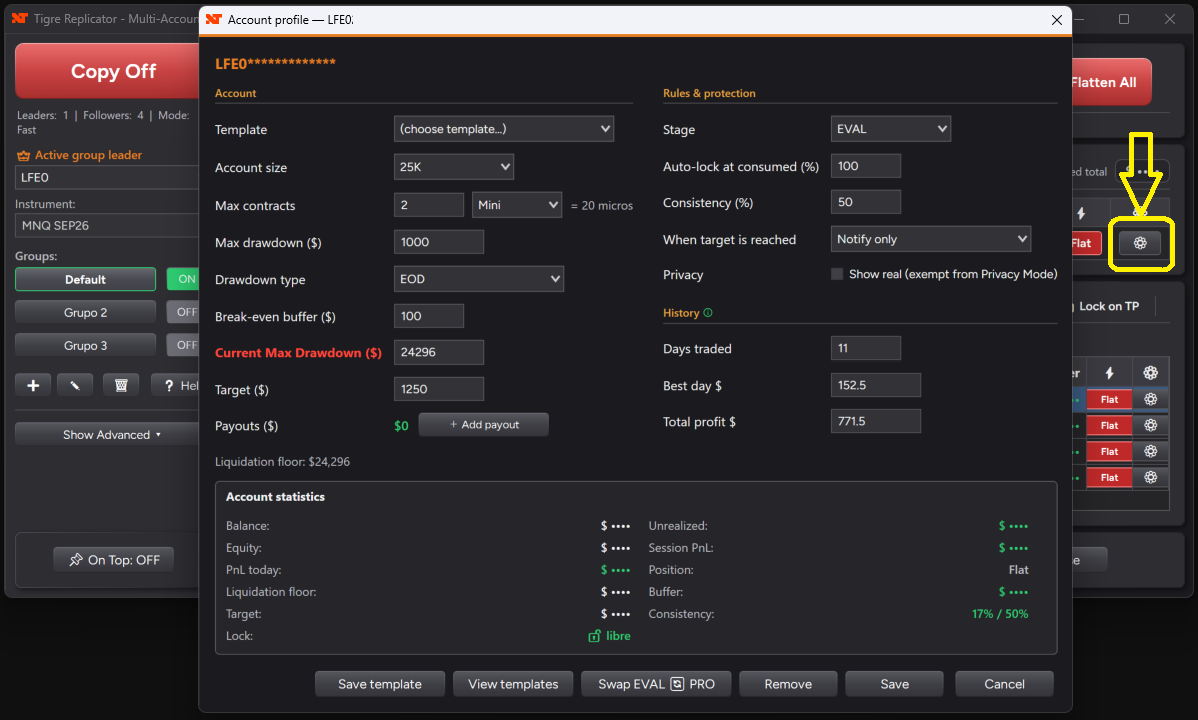
Deciding to copy your trades across several accounts is the easy part. The part that trips people up is the setup: which account leads, how much each follower trades, what happens when one of them hits its daily limit, and whether the whole thing quietly falls apart the moment your connection drops.
This guide walks through the whole thing in five steps, in the order you actually do it. If you are still deciding whether trade copying is for you at all, start with our guide on copying trades across prop firm accounts — this one assumes you have already made that call.
Before you start
- NinjaTrader 8, with every account you want to copy connected in the same instance — the copier moves orders between accounts inside your platform, not between two computers.
- The instrument and expiry you will actually trade, decided in advance. This is where most setups go wrong.
- A Sim account or two. Do the entire first run on Sim; there is no reason to learn the behaviour with a funded account on the line.
- Twenty quiet minutes outside market hours. Setting this up while the session is running is how you end up with a position you did not intend.
Step 1 — Connect the leader and the followers
One account leads. Every order you place there is what the others repeat. Pick the account you genuinely trade from — usually your main funded account or a Sim account you use as a control panel — and add the rest as followers.
For each follower you set two things that matter more than they look:
- The size multiplier (the ratio). A follower at 3 trades three contracts for every one on the leader. Set this from the smallest account's margin, not from the biggest — the ratio that is comfortable on a 150K account can reject orders on a 25K one.
- The instrument. Either the follower mirrors whatever the leader trades, or you pin it to a specific contract. Pinning is useful when a firm only allows micros: the leader trades NQ, the follower trades MNQ.
- A maximum number of contracts, as a hard ceiling that the multiplier can never push past.
Step 2 — Set the risk rules, account by account
This is the step people skip, and it is the one that saves accounts. Every account gets its own limits, because every account has its own rules: an evaluation on stage one is not the same animal as a funded account you have been paid from.
- Daily loss limit — the number at which that account stops for the day, no discussion.
- Profit target — the number at which it also stops. Protecting a good day is worth as much as cutting a bad one.
- Account size and drawdown type — trailing or end-of-day. Match this to what your firm actually uses, or the floor you see will not be the floor they enforce.
- Stage — evaluation or funded, so the limits follow the account as it progresses.
If you run your accounts in groups — evaluations in one, funded in another — each group keeps its own profit and loss limits, independently of the rest.
Step 3 — Trade the leader, normally
Once it is running, nothing about your trading changes. You take the entry on the leader, you move the stop, you take the target — and every follower repeats it in real time, sized by its own rules. One chart, one decision. That is the entire point: the copier should disappear once it is set up.
Before your first live session, run the pre-copy checklist. It tells you in one glance whether you can start — and, just as usefully, distinguishes what actually blocks the start from what is only a warning.
Step 4 — Let the protection do its job
The moment an account reaches one of its limits, it locks by itself. Locked means it stops copying, its open positions can be flattened, and it will not take another order for the rest of the session — regardless of what you are feeling at that moment. That is the feature: it does not depend on your willpower at the worst possible time.
- Auto-flat before the close, at a time you choose, so nothing is left open into the session change.
- The guard only flattens the accounts in the group that tripped it — your other groups keep running untouched.
- If an account loses its connection you are told immediately, with a warning that it may drift out of sync. When it comes back, one click re-checks every account before you keep trading.
Step 5 — The next session starts clean
Locked accounts unlock on their own when the next session opens, reset and ready to copy again. There is nothing to remember and nothing to switch back on — which matters, because a protection you have to re-enable by hand every morning is a protection you will eventually forget.
The four mistakes we see most
- Mismatched contracts. The leader on NQ and a follower on MNQ without adjusting the ratio is not a smaller position — it is a tenth of the one you think you have.
- Sizing from the biggest account. Set the ratio so the smallest account can fill it, then scale the others up.
- The wrong drawdown type. Trailing and end-of-day behave completely differently near the floor. Copy exactly what your firm uses.
- Going live on day one. Run a full session on Sim first, including a deliberate limit breach, so you have seen the lock happen before it happens with money on it.
Try it on your own platform
Reading about a copier only gets you so far — what settles it is watching your own accounts mirror a trade, and watching one of them lock itself when it hits the number you set. TGReplicator runs inside NinjaTrader 8 with a free 7-day demo, no card required, and it is a one-time licence rather than another monthly subscription.