TGChartTraderLite
Chart trader essentials · For NinjaTrader 8
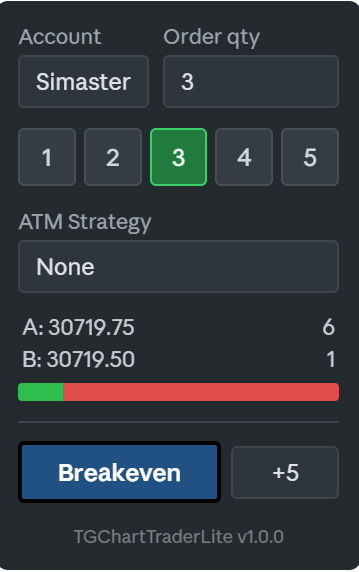
Three things NinjaTrader's Chart Trader makes you work for, added right where you already look: one-click position sizing, a live read on which side the resting size sits, and a Breakeven button that respects your take profit. No licence key, no expiry.
What it does
Size in one click
A row of quantity buttons sits directly under Order qty. Tap 3 and you are trading three contracts — no typing, no clicking the spinner four times.
It writes into NinjaTrader's own quantity box, so the native buttons and your ATM strategy follow along. The sizes run 1 to 5, and the active one stays highlighted so you always know what you are about to send.
Bid/ask balance meter
A slim bar under the A and B labels showing how the resting size splits between the two sides. Green is the bid, red is the ask.
Smoothed on purpose: raw bid and ask sizes change many times a second and are unreadable. This shows the trend instead of the flicker. Double click to mute it, one click brings it back.
Breakeven, with a cushion
One button moves your stop to the entry price. The spinner beside it sets how many ticks beyond entry you want it, so you can lock in a small gain instead of an exact scratch.
The mouse wheel moves it a tick at a time, Ctrl and the wheel moves ten. If a take profit is already working it is re-linked to the new stop as an OCO pair: fill one and the other cancels itself.
What you need
- NinjaTrader 8
- The Chart Trader panel open on the chart — this tool attaches itself to it
- Nothing else: no account, no key, no expiry
Install
- 1Download the .zip file. Do not unzip it.
- 2In NinjaTrader: Tools → Import → NinjaScript Add-On… and pick the file.
- 3Open a chart and press Ctrl+T (or the Chart Trader button) so the trading panel is visible.
- 4Right click the chart → Indicators… and add TGChartTraderLite.
Nothing showing up?
The panel attaches to NinjaTrader's trading panel, so it has nowhere to appear until the Chart Trader is open. And if you add the full TGChartTrader to the same chart, the Lite panel steps aside on its own — the two never fight over the space.
Want the rest?
TGChartTrader is the full version: trade straight from the price axis, see the trade before you take it, and manage the position without leaving the chart.
- Quick Bars
- TP/SL preview with shaded zones
- Take Profit & Stop Loss
- Lock 50% Profit
- Close 50% · Cancel All
- Trail Stop · Flatten Everything
- Live risk in dollars
- TGReplicator integration